Park/Neutral Position and Backup Lamp Switch Adjustment for Chevrolet Chevrolet C-Series Medium Duty Truck B7 2001
Tools Required
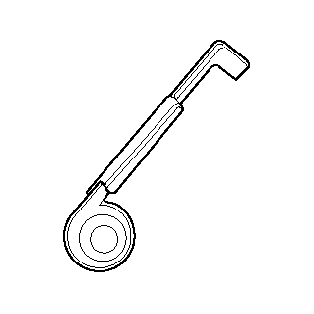
J 41364-A PNP Switch Adjusting Tool
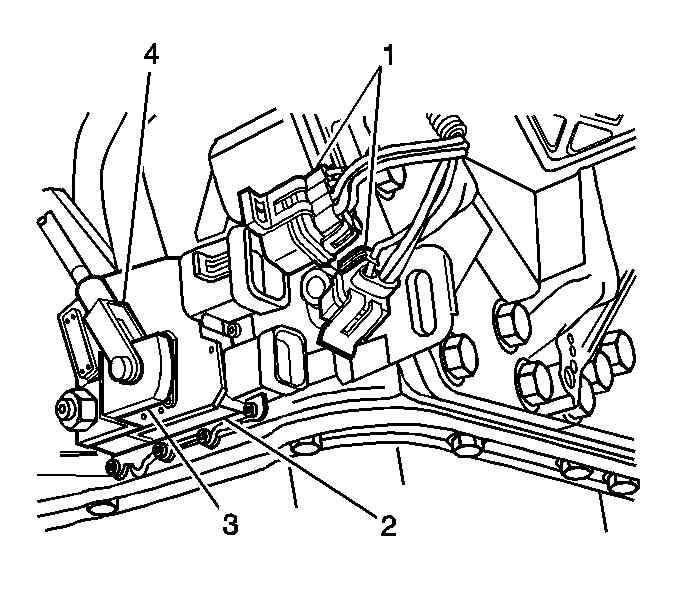
- Disconnect the Park/Neutral Position (PNP) switch electrical connectors (1).
- Remove the shift linkage/cable (4) from the shift lever (3).
- Use a wrench (1) to prevent the shift lever (2) from rotating, remove the nut (3) and the shift lever (2) from the selector shaft (4).
- Loosen the 2 PNP switch bolts (6) so that the PNP switch may be rotated with some effort.
- Put the selector shaft in the N (Neutral) position as follows:
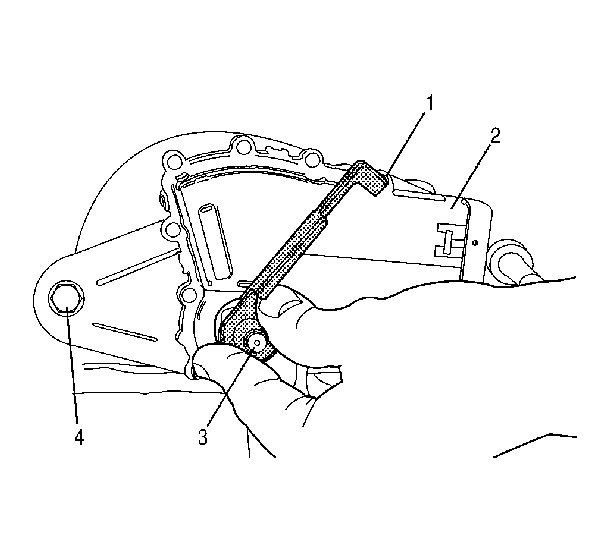
- Position the J 41364-A over the selector shaft (3) so the 2 tabs on the tool engage the 2 slots in the PNP switch (2) just outside the selector shaft. Rotate the PNP switch (2) until the single tab (1) at the other end of the tool engages the single slot at the top of the PNP switch.
- Hold the special tool in engagement with the PNP switch to maintain alignment of the PNP switch with the selector shaft.
- Install the shift lever (2).
- Install the nut (3), to the end of selector shaft (4). Use a wrench (1) to keep the shift lever from rotating.
- Install the shift selector linkage/cable (4) to the shift lever (3).
- Connect the PNP switch electrical connectors (1).
- Inspect for proper operation.
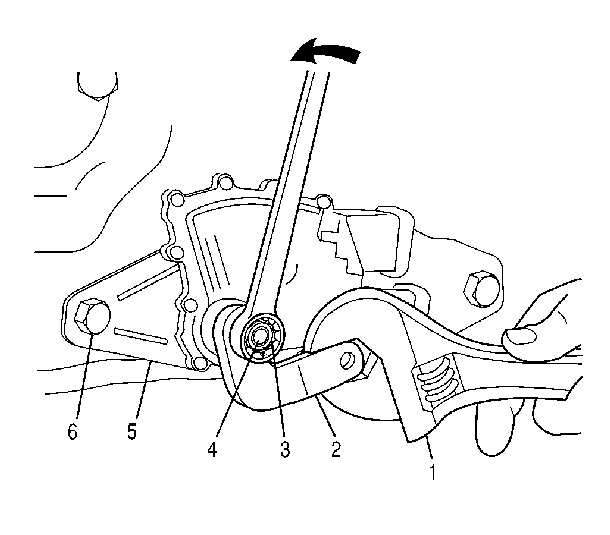
| 5.1. | Place a wrench on the selector shaft flats and rotate the shaft to its furthest clockwise position. |
| 5.2. | Rotate the selector shaft counterclockwise 2 detents. |
Notice: Use the correct fastener in the correct location. Replacement fasteners must be the correct part number for that application. Fasteners requiring replacement or fasteners requiring the use of thread locking compound or sealant are identified in the service procedure. Do not use paints, lubricants, or corrosion inhibitors on fasteners or fastener joint surfaces unless specified. These coatings affect fastener torque and joint clamping force and may damage the fastener. Use the correct tightening sequence and specifications when installing fasteners in order to avoid damage to parts and systems.
Tighten
Tighten the 2 bolts (4) to 27 N·m (20 lb ft).

Notice:
• DO NOT drive the selector lever onto the selector shaft. • DO NOT use an impact wrench in order to tighten the selector lever
nut. Hold the lever with a wrench while tightening the nut. • Failure to follow these instructions may result in transmission
damage.
Tighten
Tighten the nut to 24 N·m (18 lb ft).
