Climate Control System for GMC Truck Sonoma Pickup - 2WD 2004
With this system you can control the heating, cooling and ventilation for your vehicle.
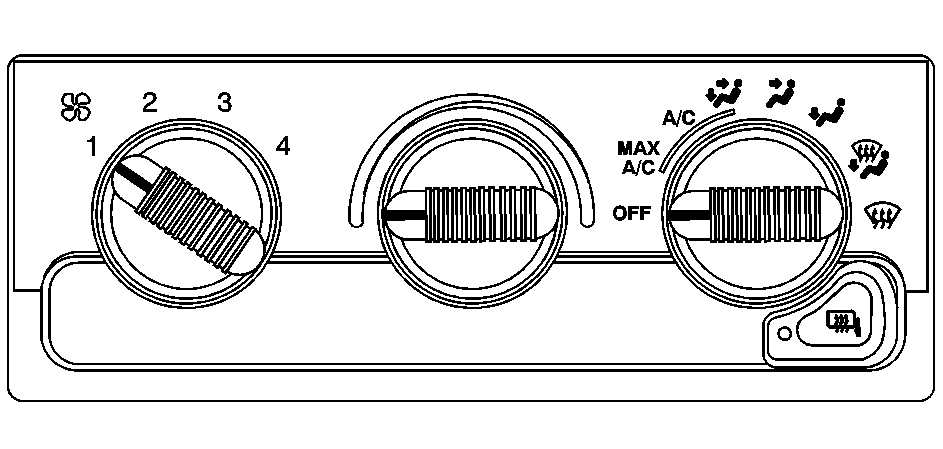
Operation
Mode Knob: Turn the right knob clockwise or counterclockwise to direct the airflow inside of your vehicle.(Vent): This mode directs air to the instrument panel outlets, with a little air directed toward the floor vents.
(Bi-Level): This mode directs half of the air to the instrument panel outlets, then directs most of the remaining air to the floor outlets. A little air is also directed toward the windshield and the side window outlets. Cooler air is directed to the upper outlets and warmer air to the floor outlets.
(Floor): This mode directs most of the air to the floor outlets with a little air directed to the windshield and the side window outlets.
(Fan): Turn the left knob clockwise or counterclockwise to increase or decrease the fan speed. Turn the mode knob to OFF to turn off the fan.
The mode knob can also be used to select defog or defrost mode. For more information, see "Defogging" later in this section.
Temperature Knob: Turn the center knob clockwise or counterclockwise to raise or lower the temperature on the inside of your vehicle. When it's cold outside 0°F (-18°C) or lower, use the engine coolant heater, if equipped, to provide warmer air faster to your vehicle. An engine coolant heater warms the coolant that the engine uses to provide heat to warm the inside of your vehicle. For more information, see Engine Coolant Heater .A/C (Air Conditioning): Turn the knob to the A/C position to turn the air-conditioning system on or off. When the system is on, this setting cools and dehumidifies the air entering your vehicle and directs it through the floor outlets as well as the instrument panel outlets.
MAX A/C (Maximum Air Conditioning): This mode recirculates much of the air inside your vehicle so it cools quickly. It directs most of the air through the instrument panel outlets and a small amount through the floor outlets.
For quick cool down on hot days, do the following:
- Select A/C.
- Select the coolest temperature.
- Select the highest fan speed.
You may notice a slight change in engine performance when the air-conditioning compressor shuts off and turns on again. This is normal. The system is designed to make adjustments to help with fuel economy while still maintaining the selected temperature.
The air-conditioning system removes moisture from the air, so you may sometimes notice a small amount of water dripping underneath your vehicle while idling or after turning off the engine. This is normal.
Defogging and Defrosting
Fog on the inside of the windows is a result of high humidity (moisture) condensing on the cool window glass. This can be minimized if the climate control system is used properly. There are two modes to clear fog or frost from your windshield and side windows. Use the defog mode to clear the windows of fog or moisture and warm the passengers. Use the defrost mode to remove fog or frost from the windshield more quickly. For best results, clear all snow and ice from the windshield before defrosting.
(Defog): This mode can be used on cool, humid days to keep the windshield and side windows clear.(Defrost): This mode directs most of the air to the windshield and the side window outlets, with only a little air directed to the floor outlets. When you select this mode, the system runs the air-conditioning compressor unless the outside temperature is at or below freezing. Do not drive the vehicle until all the windows are clear.
